Account Alert
Overview
In the Account Notes view, users may select Alert Area(s) indicating if and when the note will pop up and alert the next user who works with this patient. When "Appointments" is selected, the alert pops up during the scheduling process after an appointment is selected but before it is booked. Appointment alerts are also appointment-specific alerts displayed on the clipboard.
What's New
The first checkbox in the Alert Area has been changed from "Appointments" to "Scheduling" in order to differentiate and avoid confusion with other types of appointment alerts.
Instructions:
Select a patient from the Patient List screen.
Click the Acct Notes button to open the Account Notes screen.
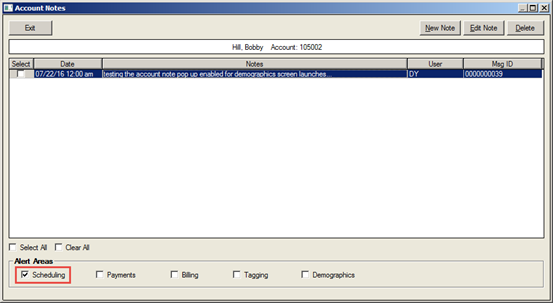
Locate the Scheduling checkbox in the Alert Areas section of the screen.
Click the checkbox to enable the alert.