Patient Relationship Dropdown Options
Overview
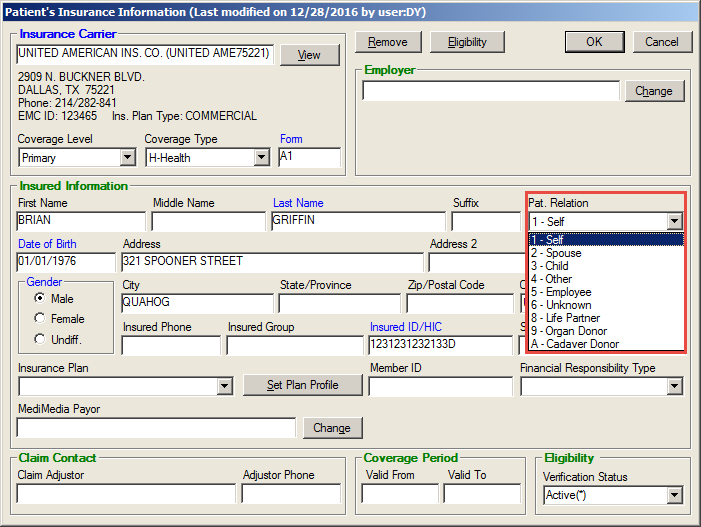
The current Patient Relationship drop-down list on the Patient's Insurance Information screen is based on codes available in ANSI 4010.
What's New
The drop-down list has been updated to reflect the difference between the ANSI 4010 codes and the ANSI 5010 codes. This update ensures that any legacy codes are updated to meet the new list:
Enable
UPDATE CLNAME
SET RELATION = '4'
WHERE RELATION NOT IN ('1','2','3','4','5','6','8','9','A')
The current 5010 options are as follows:
2-Spouse (CLNAME.RELATION = 2)
3-Child (CLNAME.RELATION = 3)
4-Other (CLNAME.RELATION = 4)
5-Employee (CLNAME.RELATION = 5)
6-Unknown (CLNAME.RELATION = 6)
8-Life Partner (CLNAME.RELATION = 8)
9-Organ Donor (CLNAME.RELATION = 9)
A-Cadaver Donor (CLNAME.RELATION = A)
Instructions
Click the Demographics button on the Patient List screen for the selected patient.
Click the Add Coverage button in the Insurance Coverages section of the Demographics screen to open the Patient’s Insurance Information screen.
Click the Dropdown arrow in the Pat. Relation field.
Select the option that best describes the relation of the insured to the patient.
Click the OK button to close the screen.