Store Additional Insurance Addresses
Overview
Refunds typically go to a different address than claims so it's cumbersome to manage that process. The suggested addition is to create a new screen that works with a new table:
What's New
A two-part method has been created for managing multiple insurance addresses.
CREATE TABLE CLINSADDRESS
(
COMPANY VARCHAR(10),
INSCODE VARCHAR(15),
ADDRESSTYPE VARCHAR(15),
ADDRESS1 VARCHAR(30),
ADDRESS2 VARCHAR(30),
CITY VARCHAR(20),
STATE VARCHAR(2),
ZIP VARCHAR(10),
USERCODE VARCHAR(10),
ATTN VARCHAR(30),
ENTERED DATETIME,
LASTUSER VARCHAR(10),
LASTEDIT DATETIME
CONSTRAINT [PK_CLINSADDRESS] PRIMARY KEY CLUSTERED
(
[COMPANY] ASC,
INSCODE ASC,
ADDRESSTYPE ASC
)
) ON [PRIMARY]
GO
GRANT select, insert, update, delete on [CLINSADDRESS] to mwuser
GO
if not exists( select * from sys.columns where name = 'ATTN' and object_id= object_id ( 'CLREFUNDCHECK' ))
ALTER TABLE CLREFUNDCHECK ADD ATTN VARCHAR(30) NULL
GO
Instructions
Part 1
Click the Preferences tab on the Main Menu screen.
Select Setup Demographic Tables from the pulldown list.
Click A Insurance Carriers to open the Insurance Carrier Entry screen.
Search for an Insurance Carrier and click OK to open the Insurance Carriers screen.
Select the desired Insurance Name and click the Edit button to open the Insurance Carrier Entry screen.
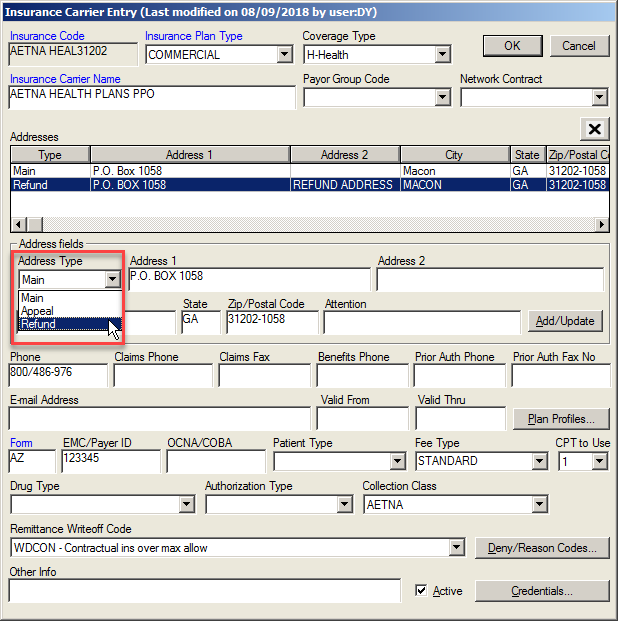
Select what type of address is being added into the system by selecting the desired type (Main, appeal, or refund) from the Address Type pulldown list. Multiple addresses for the same Insurance Carrier can be listed in the Addresses field.
Part 2
Click the Payment button on the Patient List screen for a selected patient to open the Transaction History screen.
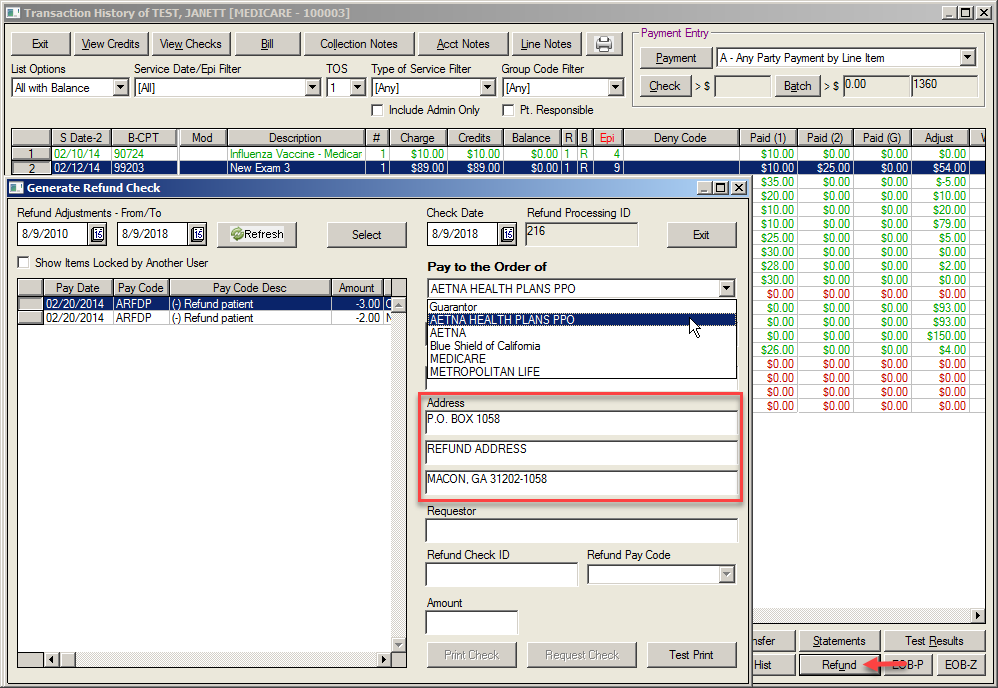
Select the desired payment.
Click the Refund button at the bottom right to open the Generate Refund Check screen. When you select an insurance that has a refund address type, it auto populates that address in the Address field instead of the main address.