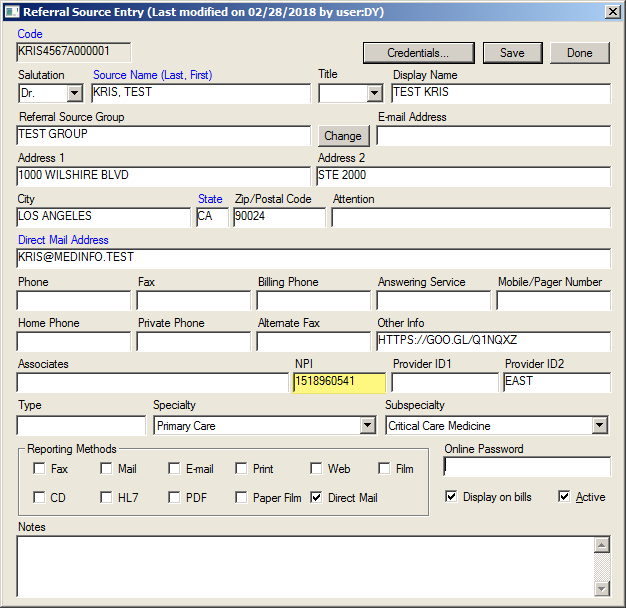
NPI field in Referral Source
Overview
National Provider Identifier (NPI) is now a standard identifier number for referral sources but lacks a named field in the set-up table. Often stored as a credential. NPI is routinely shared for HL7 provider matching and claims billing. A dedicated field would also improve user training and ongoing data maintenance.
What's New
A user can now enter a provider's NPI in a designated field in the Referral Source Entry screen so that it is readily available for billing without having to click into Credentials to view whether the NPI is present or absent. Included in the field is a character verification (10 numbers).
This new feature allows a user to:
- Set the NPI as a required field for Referral Source set-up using Demographics Preferences.
- View the NPI from the main referral set-up view.
- Avoid typing a letter or the wrong number of numbers when entering the NPI
- Store the NPI in CLREFERID
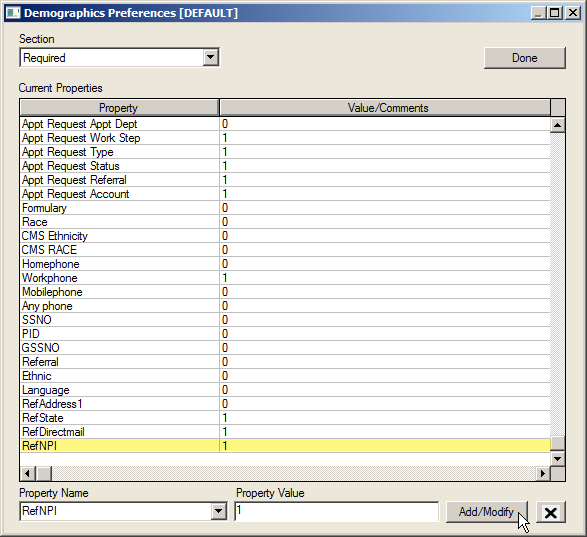
- Set the NPI field as Required using Demographics Preferences (DIMDB.TBL).
Instructions
Click the Preferences tab on the Main Menu screen.
Select Setup Demographics Tables.
Click 8 Referral Sources from the dropdown list.
Select the Referral Provider from the Referring/Related Provider list.
Click the Edit button.
Enter the NPI in the NPI field.
Click the Done button.
Click N Demographics Preferences from the dropdown list.
Open the Demographics Preferences screen.
Select Required from the Section dropdown list.
Select RefNPI from the Property Name dropdown listl.
Enter 1 in the Property Value field.
Click the Add/Modify button.