Billing Flags
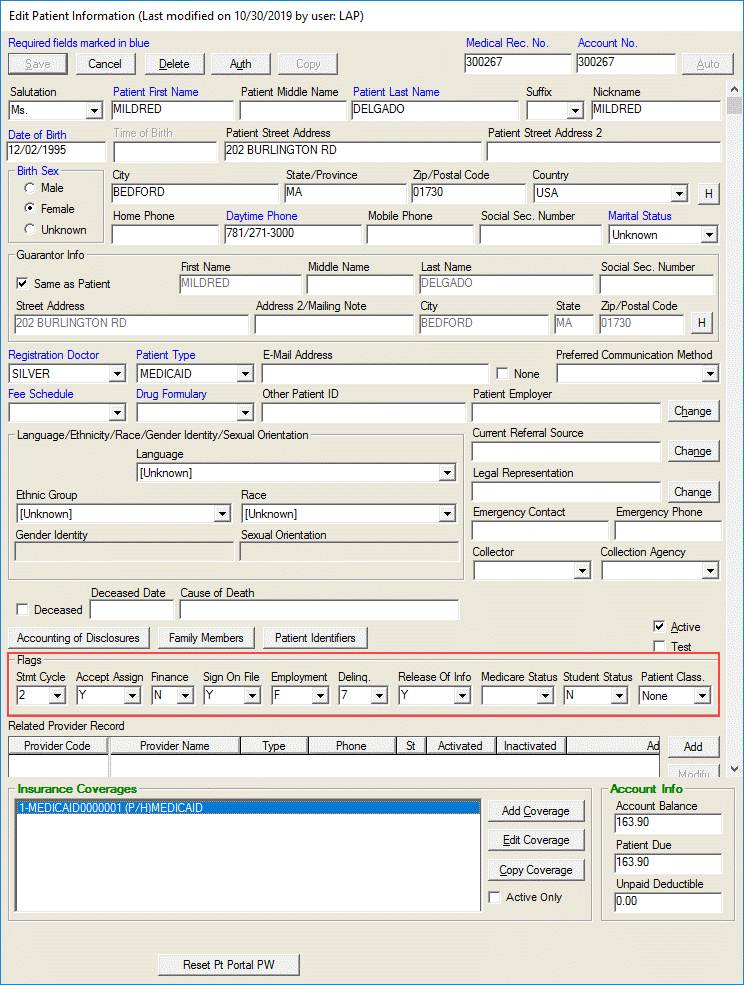
The Billing Flags are located on the Demographics screen above the Related Provider record field. They are used primarily by the billing staff to change the billing status and/or dunning level of an account.

-
Stmt Cycle-Indicates the statement cycle computed when a new charge is entered. Usually, this is set to one (1), however zero (0) can be used if no statements are to be sent or if Statement Cycles are not used.
-
Accept Assign-Indicates whether practice is or is not contracted with patient’s insurance carrier. Y=Yes, N=No
-
Finance-Indicates whether practice agrees to financing. Y=Yes, N=No
-
Sig On File-Indicates signed patient authorization is on file. Always use Y=Yes or N=No. B, C, S M, or P indicate how obtained and retained. B=Signed signature authoriation forms for both block 1 and block 13 are on file, C=Signed CMS Claim Form on file, S=Signed signature authorization for block 12 on file, M=Signed signature for block 13 on file, P=Signature generated by provider because patient is not physically present for services.
-
Employment-Indicates employment status F=Full, P=Part, R=Retired, U=Unknown
-
Delinquency-Indicates age of oldest open patient balance on the account. Levels 0-9 and A, B and C are automatically calculated on a nightly basis during the patient aging process. Flags D through Z are user defined.
-
Release of Info-Indicates authorization signed by patient is on file that authorizes release of information to other organizations. Y=Yes, N=No.
-
Medicare Status-unused field.
-
Student Status-unused field.
- Patient Class-Indicates whether patient is VIP status or an employee status which limits and tracks access to the patient’s chart. None, VIP, Employee.