Password Security Policies
Setting password security policies is an important step to ensuring that access to the MedInformatix Client is secure and not easily guessed.
To set security policies, access the Session Parameters window from the Properties menu in the MedInformatix Server Configuration on the Application Server.
Example:
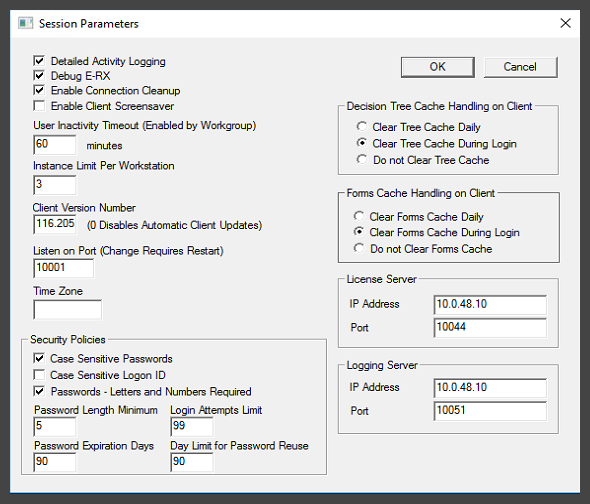
Security Policy Descriptions
Case Sensitive Passwords
What is it? It is a checkbox that enables or disables a requirement for the user to type their password in the letter case they saved it in.
What does it do? When enabled (recommended), the user must type their password using the proper letter case. When disabled (not recommended), letter case is ignored.
When does it take effect? Immediately upon saving Security Policies.
Case Sensitive Logon ID
What is it? It is a checkbox that enables or disables a requirement for the user to type their Logon ID in the letter case it was saved in. Normally, it is all UPPER CASE.
What does it do? When enabled (not recommended), the user must type their Logon ID in the proper letter case. When disabled (recommended), letter case is ignored.
When does it take effect? Immediately upon saving Security Policies.
Passwords - Letters and Numbers Required
What is it? It is a password complexity setting checkbox that enables or disables a requirements for the user to use letters AND numbers when setting their password.
What does it do? When enabled (recommended), the user must type at least one letter and one number when setting a new password. When disabled (not recommended), the user can type any combination of characters - all letters, all numbers, or a mix. Note that standard special characters [!@#$%^&*()_+] are also allowed, but can not be set as required.
When does it take effect? When the user next changes their password after the setting is saved.
Password Length Minimum
What is it? It is a password complexity field that sets the minimum length of a password. The minimum value is 0 (no minimum required - not recommended) and the maximum value is 12 characters.
What does it do? When a user is setting a new password, if the new password does not meet the Password Length Minimum required value, then the user receives an error. Example:
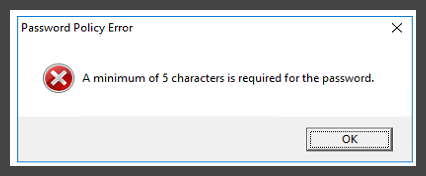
When does it take effect? When the user next changes their password after the setting is saved.
If I change this setting to a greater number, does it impact users' current passwords? No, it only applies when they next change their passwords.
Password Expiration Days
What is it? It is a password maintenance field that sets the number of days in which a new password will expire. The minimum value is 0 days (never expires - not recommended) and the maximum value is 999 days.
What does it do? When a user's password reaches this number of days from when they last reset it, they are prompted to change it. The new password must meet all current complexity rules.
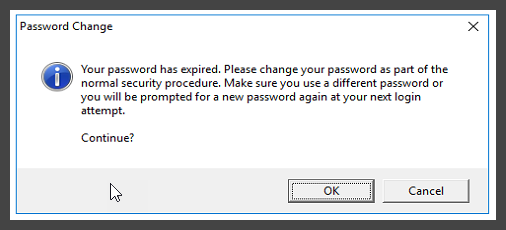
When does it take effect? Immediately upon saving Security Policies.
Login Attempts Limit
What is it? It is a security control that helps prevent brute force attacks by limiting the number of failed login attempts before shutting down the MedInformatix Client.
What does it do? When a user reaches the limit as configured in Secuity Policies, the MedInformatix Client closes and displays the following messge:

When does it take effect? Immediately upon saving Security Policies.
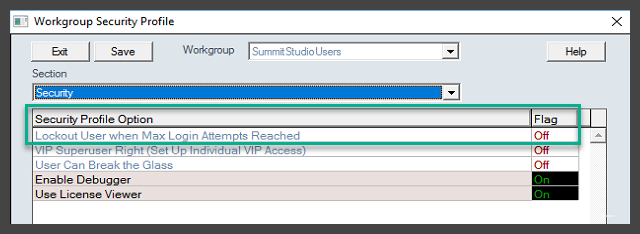
If a user reaches the maximum login attempts, do they get locked out of their account? Yes, if the "Lockedout User when Max Login Attempts Reached" setting is enabled (On) for the associated Workgroup Security Profile. If disabled (Off), users will not be locked out and will be able to try again.Example:
Day Limit for Password Reuse
What is it? It is a security control that prevents a past password from being reused within the number of days specified.
What does it do? When setting a new password, if a user attempts to reuse a previous password from within the number of days specified, they are informed that they can't use it again, and must start over with resetting their password.
When does it take effect? When the user next changes their password after the setting is saved.