PATIENT SELF-SCHEDULING METRICS

OVERVIEW
Track the number of patients who self-schedule and/or upload documents to MedInformatix. Depending on the application made available to patients in Production.
- KPIs are fixed, reliable, and comparable over time to yield meaningful trends with benchmarks (goals).
- Monitor performance with KPIs in a report that is optimized for mobile devices.
Requirements:
- Web Scheduler, File Application, or MI Patient Mobile App (PMA)
Note:
- Metrics will vary based on the patient-facing applications in use.
- Documents uploaded by patients using the File App are only associated with an appointment number when the default workflow is enabled, and the patient selects an appointment at the time of upload. Until a user manually updates the document settings in the Document Repository, the appointment facility and department are unknown.
Pages (Tabs):
Summary Trends – Patient activity, on average, per day, month, and so far this year. Metrics will vary based on the patient-facing applications in use.
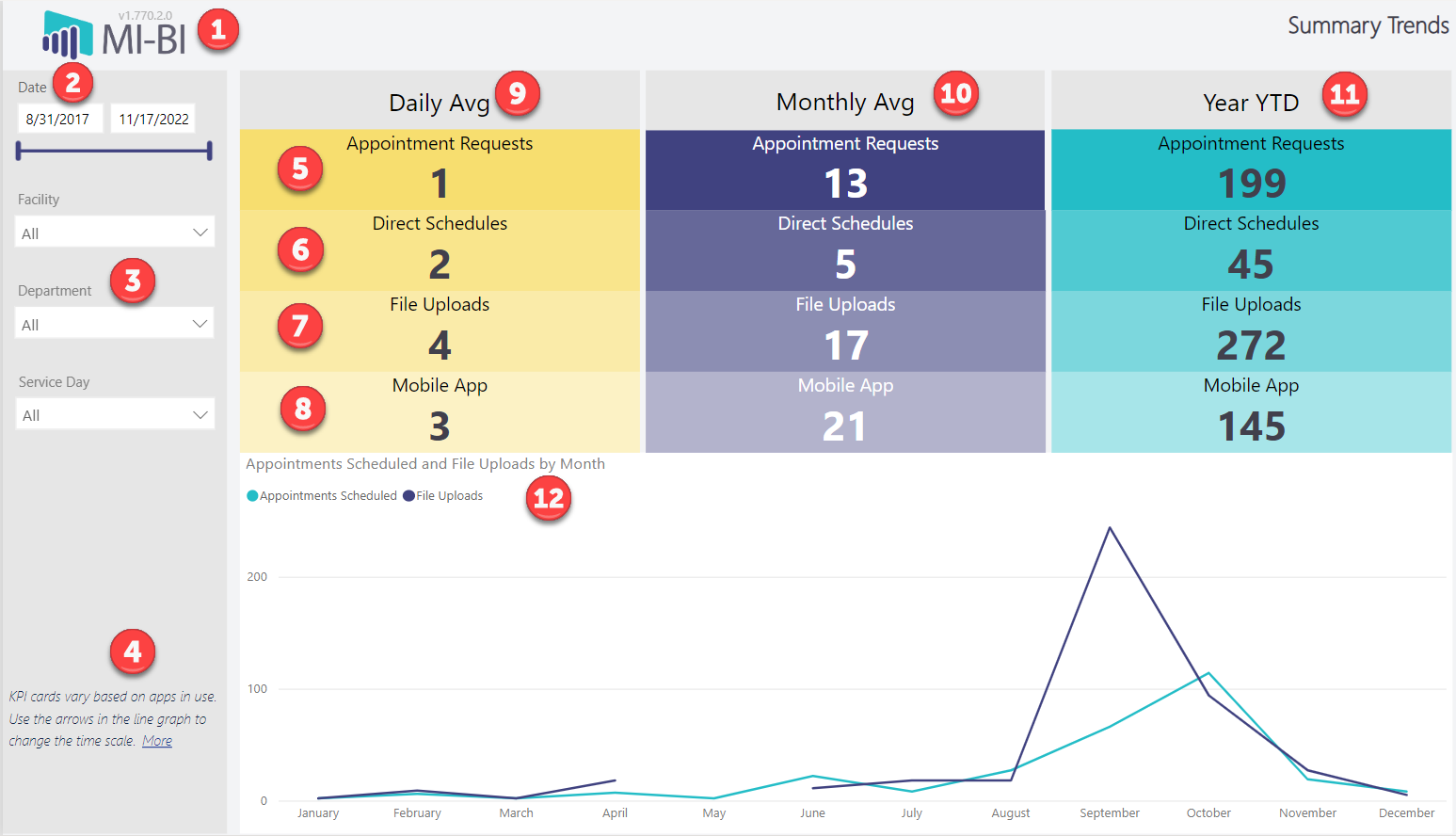
- MI-BI Logo – Displays the report version. Click to reset slicers to default values
- Current Date Range – Displays the actual date range presented in the current view
- Page Slicers (all pages):
- Date Range – Calendar date picker and slicer to select the desired date range. Defaults to the minimum and maximum date range available in this report, up to 5 years from today.
- Facility – Appointment Facility associated with the self-scheduled appointment and any documents uploaded that are linked to an appointment (where applicable)
- Department – Appointment Department, where applicable to appointment counts and uploads that are linked to an appointment.
- Service Day – Day of the week that the event occurred (e.g., scheduled appointment or document uploaded).
- Page Instructions (all pages) – Includes a More link to this documentation in Resources.
- Appointment Requests – Appointment requests include those submitted by Quick Appointment Request, the Web Scheduler when a patient is unable to direct schedule based on rules, and via MI Mobile as an “Other” appointment type
- Direct Schedules – Appointments scheduled in the Web Scheduler
- File Uploads – Documents uploaded through File App or MI Mobile
- Mobile App – Appointments scheduled in MI Mobile
- Daily Avg – Average count per day within the selected date range. Only days with patient activity are counted in the total number of days.
- Month Avg – Average count per calendar month within the selected date range. Only days with patient activity are counted in the total number of days.
- Year YTD - Current year-to-date count.
- Appointments Scheduled and File Uploads by Month (Line Chart)
- Visualize scheduled appointments and files uploaded by patients over time. Use the arrows in the top right corner of the chart to view by year, quarter, or month. Right-click a data point to drill through and view details.
Scheduling –Metrics for appointments scheduled by patients using the Web Scheduler or MI Mobile.
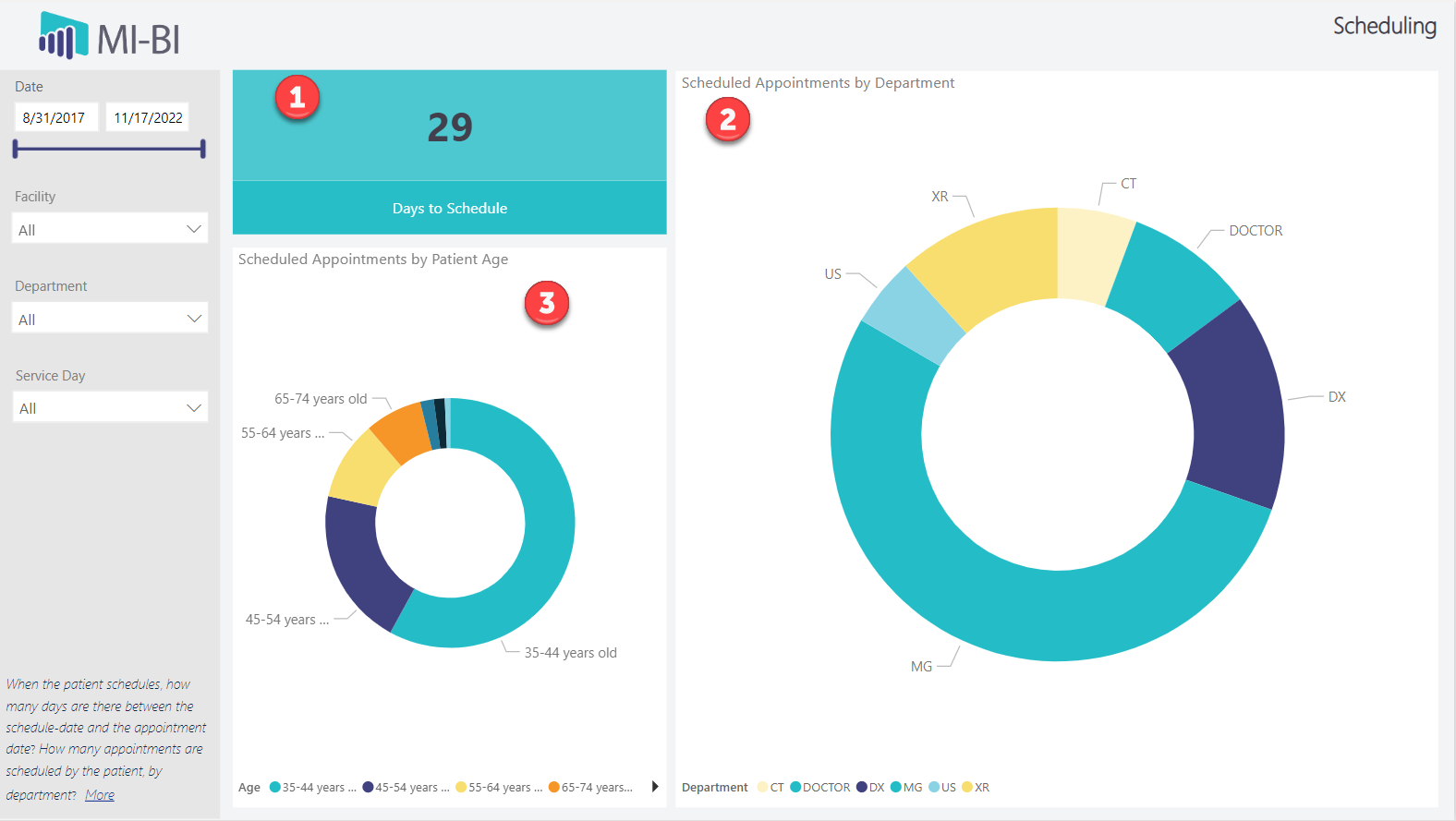
- Days to Schedule – The average number of days between when the appointment is scheduled (created) and the appointment date.
- Scheduled Appointments by Department (Donut) – Proportion of self-scheduled appointments by department (Appointment Group). Hover over any segment to see additional information:
- Department – The selected Appointment Group
- Self-Scheduled Appointments by Department – Count of self-scheduled appointments for the selected department
- Total Scheduled Appointments by Department – Total number of appointments scheduled in the selected department (scheduled by any means)
- Percentage of Self-Scheduled Appointments by Department – Percentage of self-scheduled appointments compared to the total number of scheduled appointments, for the selected department. Right-click on any segment to drill through to view appointment details.
- Scheduled appointments by Patient Age (Donut) – Proportion of self-scheduled appointments by patient age group. Hover over any segment to see additional information:
- Age – Selected age range
- Self-Scheduled Appointments by Age Range – Count of self-scheduled appointments for the selected patient age range
- Total Scheduled Appointments by Age Range – Total number of scheduled appointments by the selected patient age range (scheduled by any means)
- Percentage of Self-Scheduled Appointments by Age Range – Percentage of self-scheduled appointments compared to the total number of scheduled appointments, for the selected patient age range
Uploads – Documents uploaded by patients using the File App or MI Patient Mobile App
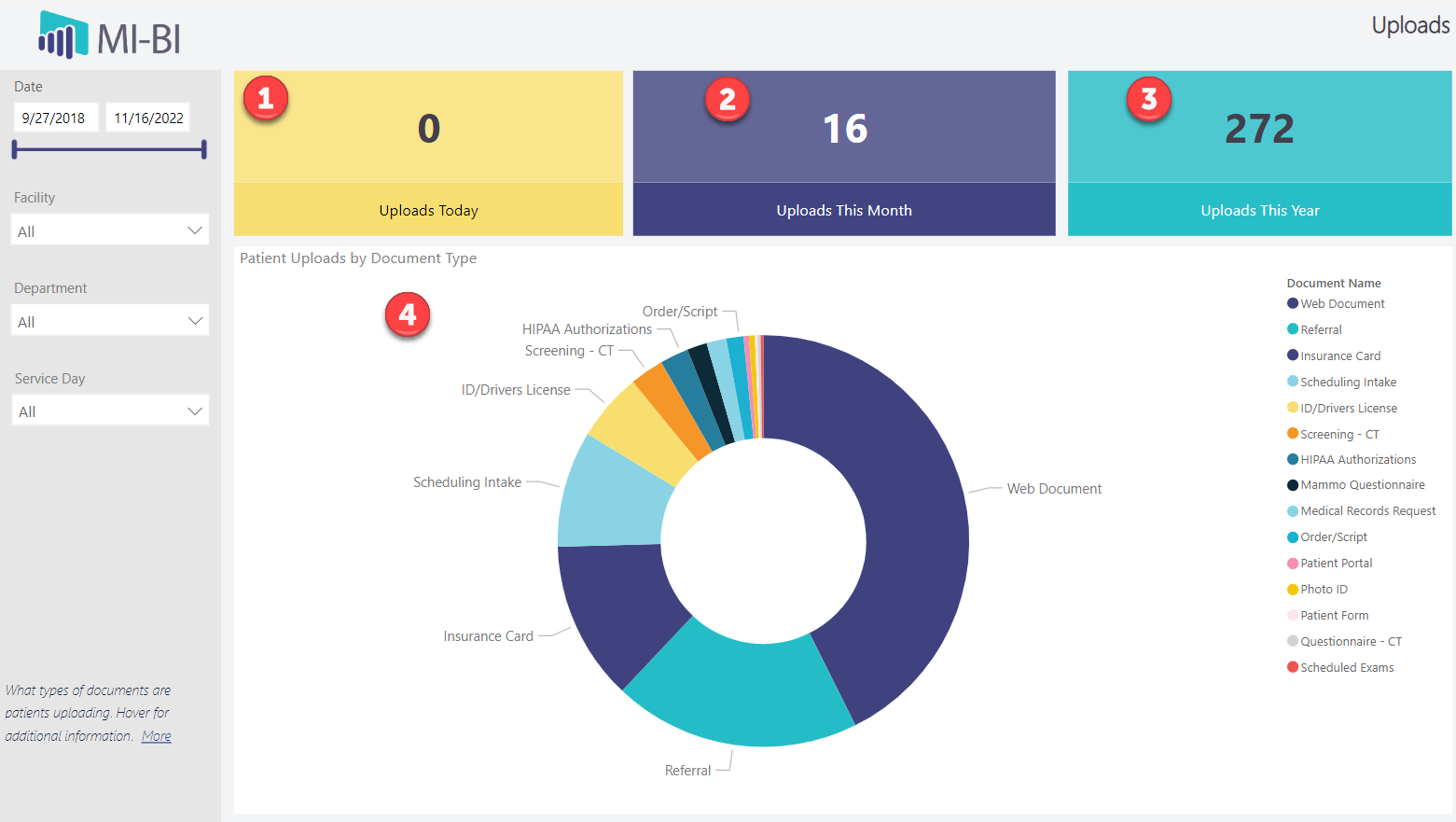
- Uploads Today – The number of documents uploaded by patients today.
- Uploads This Month – The number of documents uploaded by patients this month (current calendar month).
- YTD – Year-to-date count of documents uploaded by patients.
- Patient Uploads by Document Type – Proportion of documents uploaded by type. Drill through to view details of any segment.
Note: The Facility, Department and Service Day page slicers only apply when the uploaded document is associated with an appointment.
Details – Table of all appointments, requests, and uploads available in this report. Click any column header to sort ascending or descending.
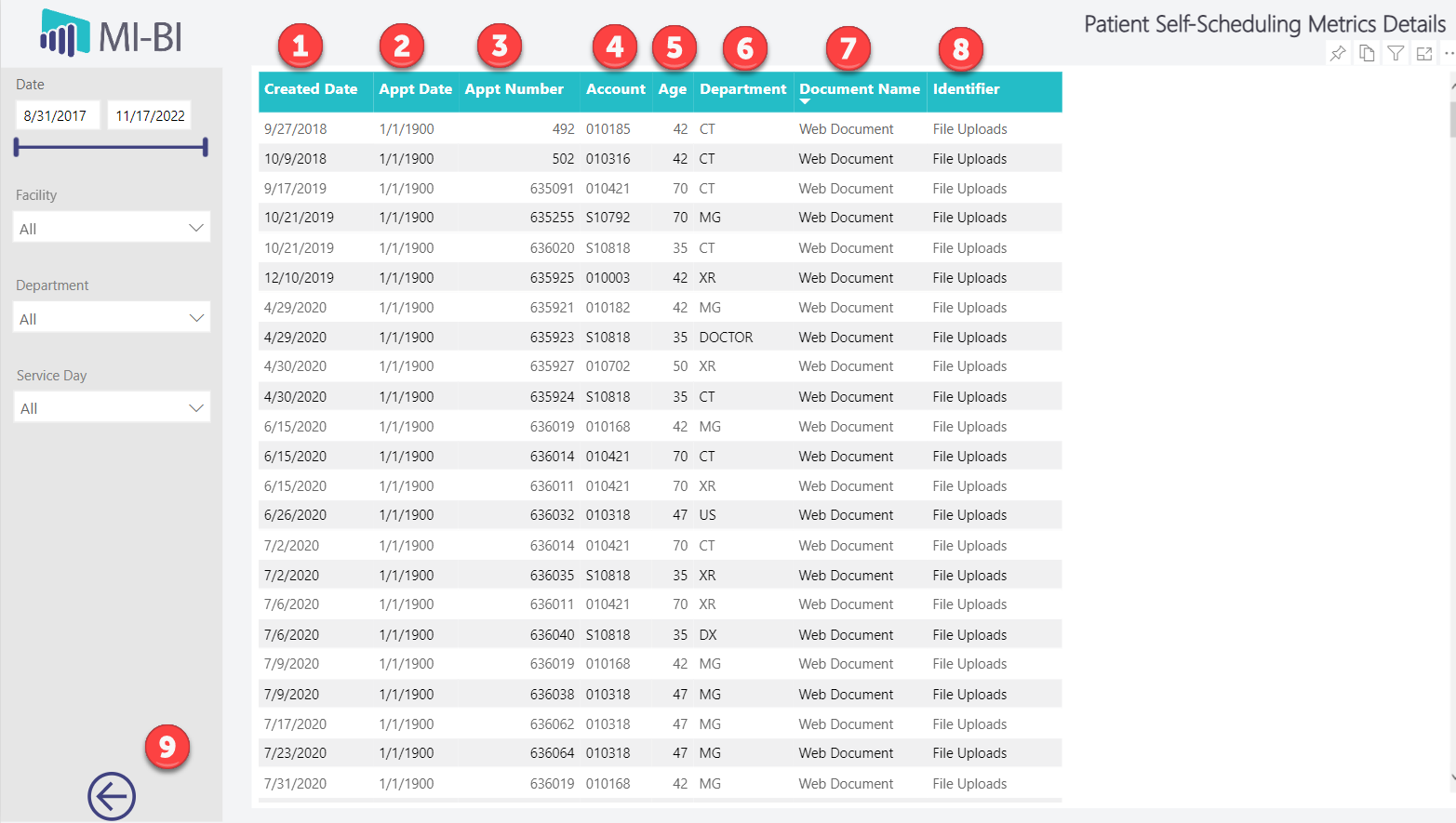
- Created Date – The date that the appointment was scheduled or requested, or when the document was uploaded
- Appointment Date – Appointment date of a self-scheduled appointment or uploaded document associated with an appointment
- Appointment Number – Appointment number of the self-scheduled appointment or uploaded document, when applicable
- Account – Patient account number, when known. Note that some appointment requests do not match an existing patient account.
- Age – The age range of the patient at the time of the appointment or document upload
- Department – Appointment Group associated with the appointment, when applicable
- Document Name – Document Type as defined in MedInformatix
- Identifier – Identifier for each entry: Direct Schedule, Appt Requests, File Upload or PMA
- Back Arrow – Click to return to the previous screen