4 - FORMULARY
MedInformatix requires a Formulary for each Patient where a prescription is electronically routed.
A DEFAULT FORMULARY will be added by MedInformatix. It can be changed, at the request of the client.
An INDIVIDUAL FORMULARY can then be added by the Client, if desired. However, it is not required, as the formulary check will be done at the time the prescription is created. See Section 7 - Add All Medication Information Including No Meds.
ADD A FORMULARY TO PATIENT DEMOGRAPHICS
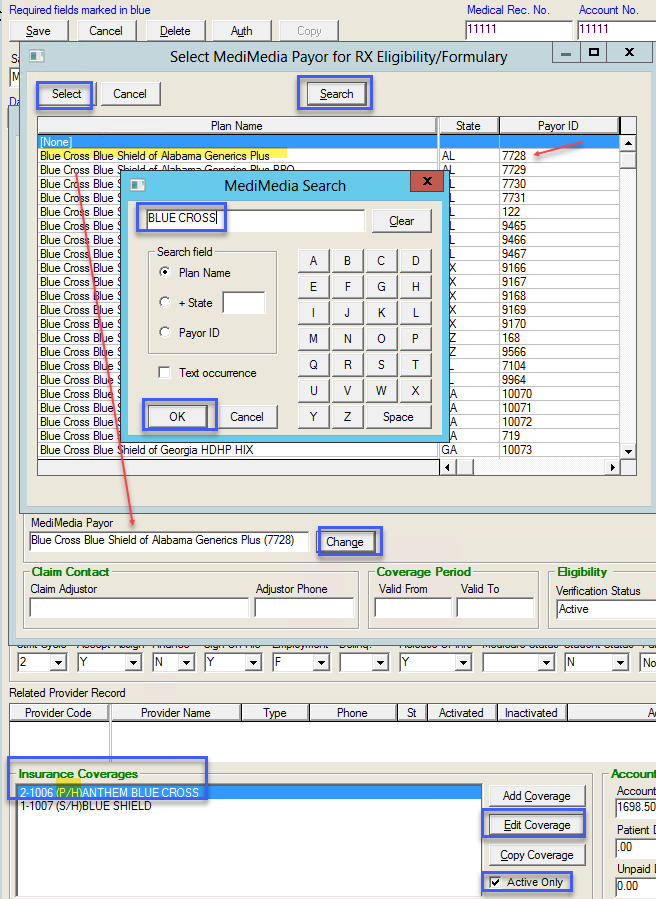
From Main Screen navigate to Patient List.
- Select a Patient
- Select ‘Demographics’
- Navigate to Insurance Coverages
- Select ‘Active Only’
- Select the PRIMARY insurance (P/H)
- Select ‘Edit Coverage’ from the ‘Patient’s Insurance Information’ screen
- Select ‘MediMedia Payor’
- Select ‘Search’
- Enter the Formulary name. This can be changed, as needed.
- ‘Select’ to choose the Formulary desired
- Select ‘Ok’ to exit the ‘Patient Insurance Information’ screen
- Select ‘Save’ in the ‘Edit Patient Information’ screen
- The formulary information will appear in the upper right corner of the Chart Rx ‘Medications History’ screen